Finance, compliance, tender, project and sales software for Indian companies.
Eleven connected apps, one Khanal ID: K-Finance, K-Secretarial, K-IPO, K-MailSign, K-Tender, K-Projects, K-CRM, K-Logistics, K-Survey, K-HR and K-Stock. Built by a finance and compliance practitioner.
Your driveYour documents stay in your own Google Drive or OneDrive
GST · TDS · ROCIndian rules first
Products
See what each app does
Screens from our demo companies (Aarav Infra Projects, Mehta & Rao Company Secretaries, Sunrise Agro Foods and Crest Capital Advisors) on our staging servers. Every name, number and email address in them is made up. Each app keeps every client’s data in its own separate organisation, and one Khanal ID signs in to all of them.
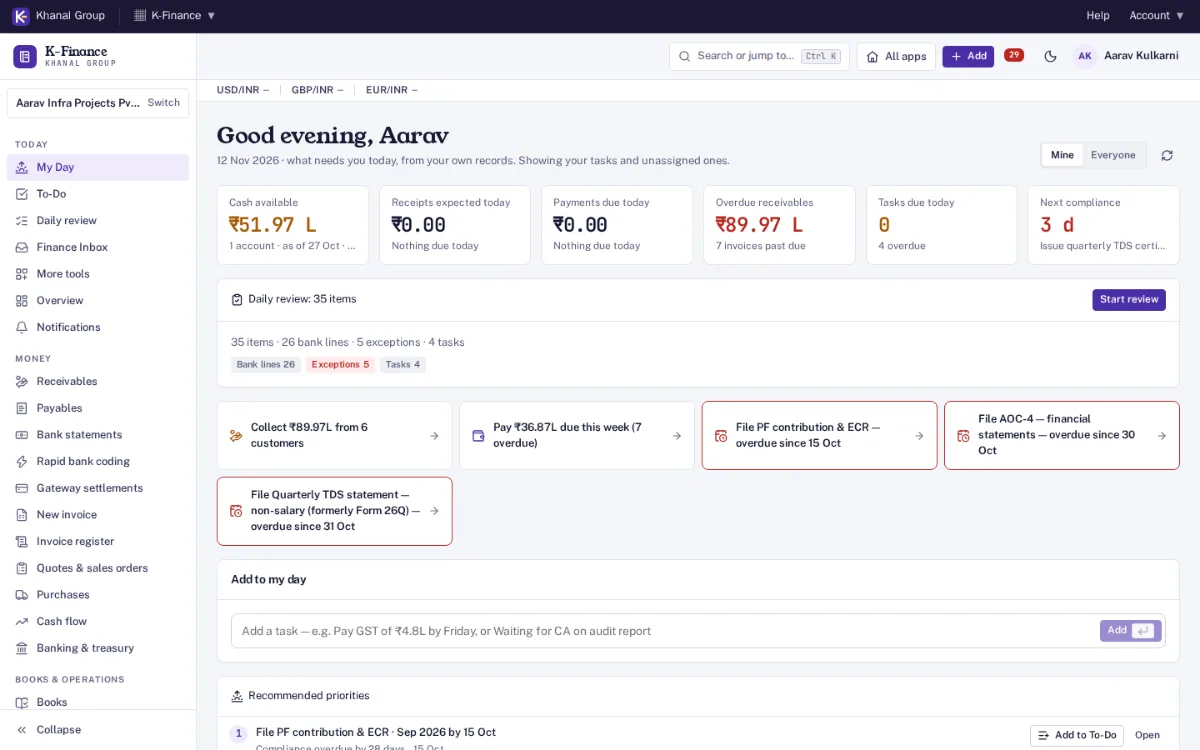
Cash in the bank, receipts expected and bills due today, read from your own books each morning.
Overdue receivables: sales invoices past their due date, added up.
Shortcuts to collect from the customers who are late, or to pay this week’s bills.
Recommended priorities, largest overdue customers first. Each one can go to your To-Do.
Demo data on staging.
FK-FinanceFinance operations
Books, GST, TDS and payroll in one finance workspace
K-Finance keeps the books of an Indian SME and the work around them: vouchers and ledgers, GST returns, TDS deductions and challans, payroll runs, bank reconciliation and import and export remittances.
My Day reads all of it each morning: cash in the bank, receipts and bills due today, which customers are late and the next filing date, then suggests who to collect from and what to pay first. You can export your organisation’s data at any time.
Vouchers, ledgers and an edit log on posted entries
GST return workflows across several GSTINs and branches
TDS / TCS tracking, challans, returns and Form 16
Bank statement coding and reconciliation with evidence
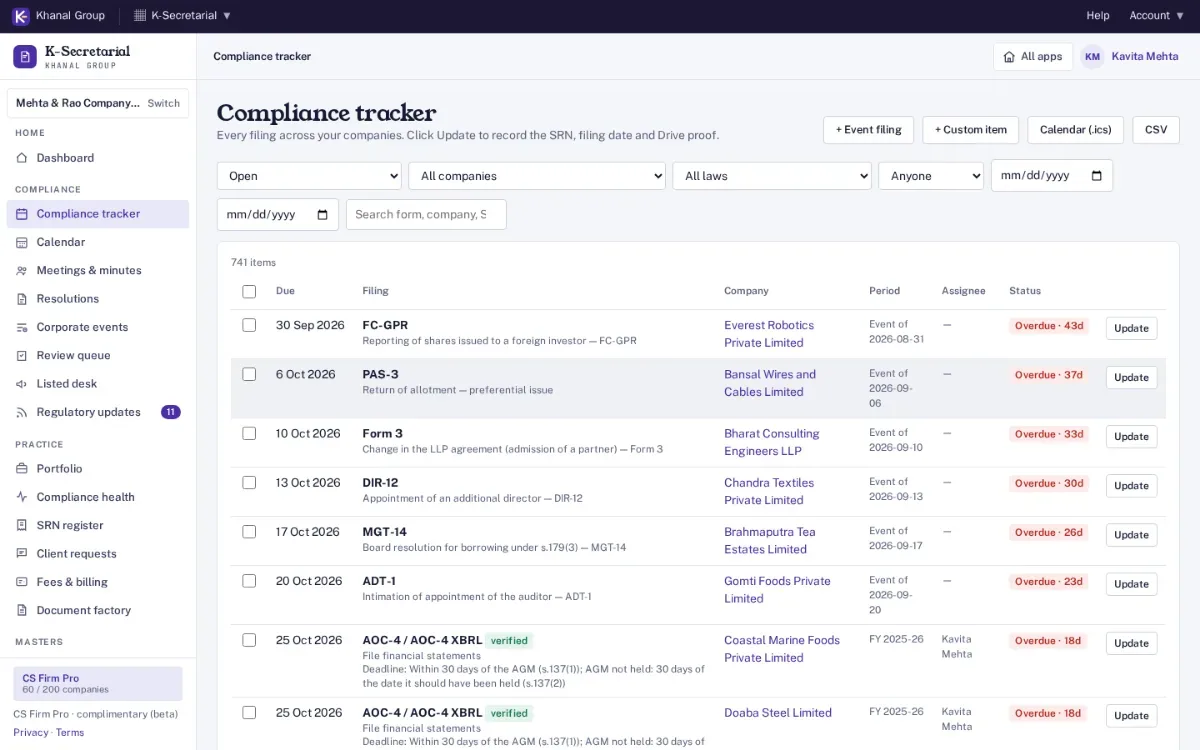
Filter by status, company, law, assignee and dates, or search by form, company or SRN.
Each filing with its due date, the form, the company and the period it belongs to.
How many days a filing is overdue.
Update records the SRN, the filing date and the proof in Drive.
Demo data on staging.
SK-SecretarialCompany secretarial
Every company’s filings, meetings and registers on one tracker
Built for practising CS firms and in-house company secretaries who look after many companies.
The compliance tracker shows the due date and status of recurring company-law filings for every company you manage, next to board and general meetings, minutes and the statutory registers.
Compliance tracker across every company you manage
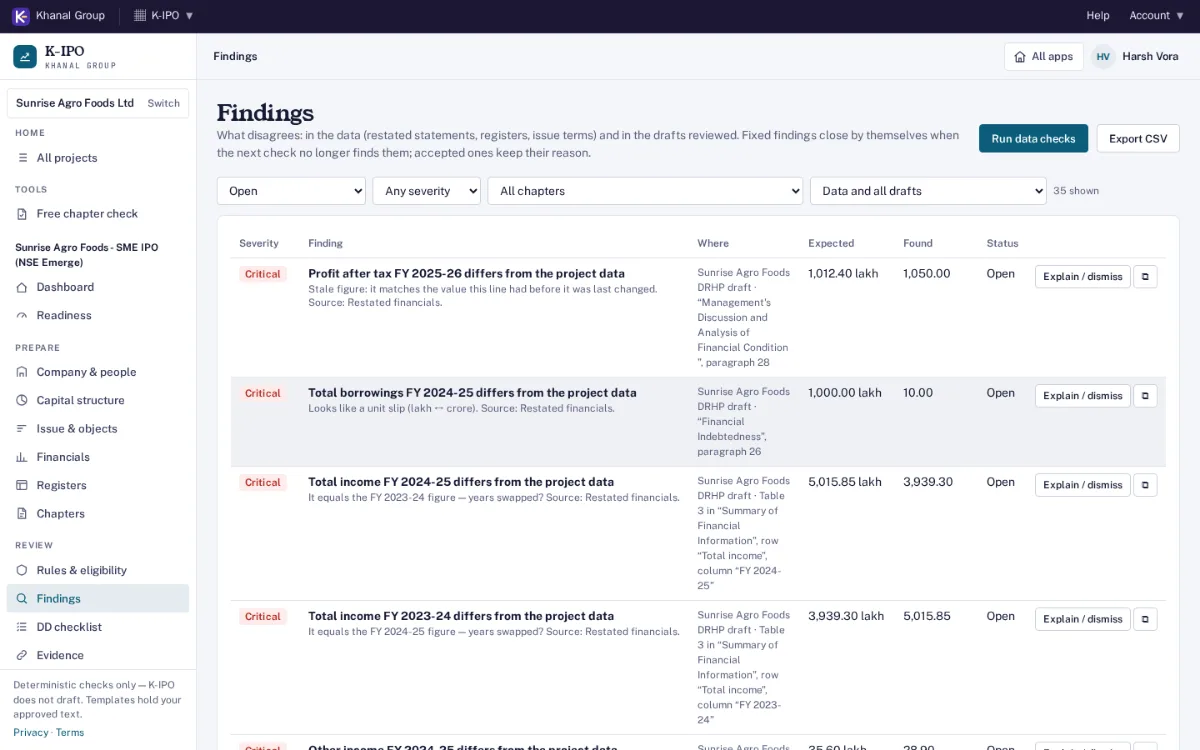
What disagrees, with a hint such as a lakh and crore slip or swapped years.
Where in the draft offer document it was found.
Fix it in the draft, or explain or dismiss it with a reason.
Demo data on staging.
IK-IPOSME IPO readiness
A working desk for an SME IPO, with checks on the draft
K-IPO is for promoters, CFOs and company secretaries preparing for an SME platform listing, and for their advisers.
It tracks the finance, secretarial and legal workstreams a listing needs, collects their documents with status and shows the open items. Data checks compare figures in the draft offer document with the project’s restated financials and list every disagreement as a finding to fix, explain or dismiss.
Readiness workstreams: finance, secretarial and legal
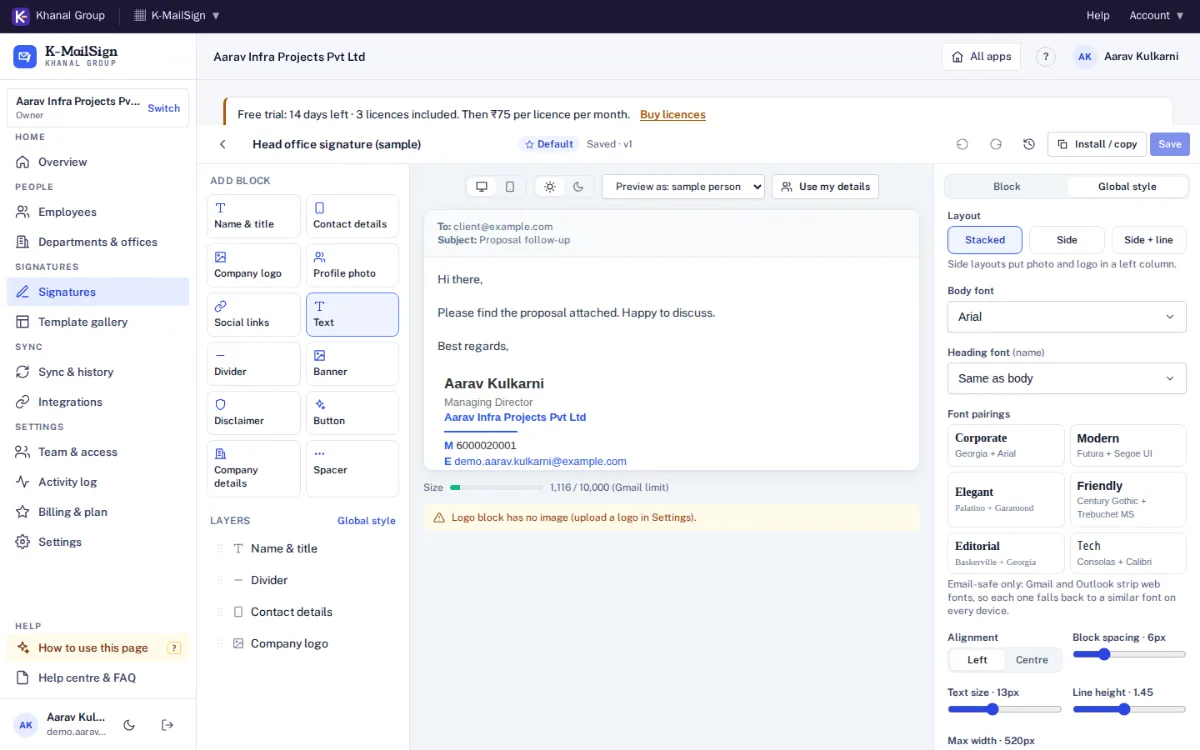
Blocks to add: name and title, contact details, logo, social links, banner, disclaimer and more.
A live preview of the signature under a sample email.
Layout, email-safe fonts, spacing and sizes for the whole signature.
Size against Gmail’s 10,000-character signature limit.
Demo data on staging.
MK-MailSignEmail signatures
One correct, on-brand email signature for every employee
K-MailSign connects to Google Workspace or Microsoft 365 with one admin sign-in. You design a signature once and assign it to people, teams or the whole company.
Names, titles and phone numbers come from your directory, so every signature stays current, including in Outlook on the web through the add-in.
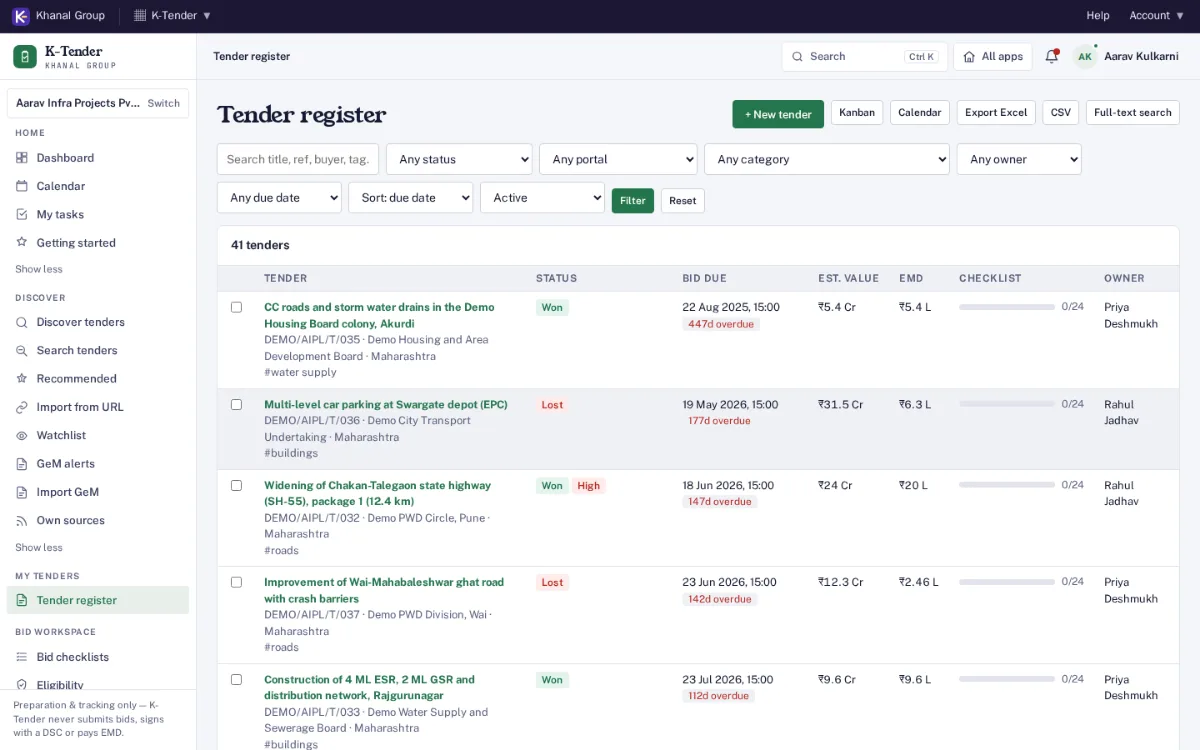
Filter by status, portal, category, owner and due date.
Each tender with its reference, buyer, state and tags.
Bid due date and time, with days left or overdue.
Bid checklist progress: items done out of the total.
Demo data on staging.
TK-TenderTender management
Every tender, deadline, EMD and bank guarantee in one register
K-Tender is for contractors, suppliers and EPC firms that bid on GeM, CPPP and state e-procurement portals.
Each tender carries its key dates with reminders 7, 3 and 1 days before, a bid checklist with owners, an eligibility check against your numbers, and the EMD and bank guarantees behind it. It prepares and tracks bids; it never submits them.
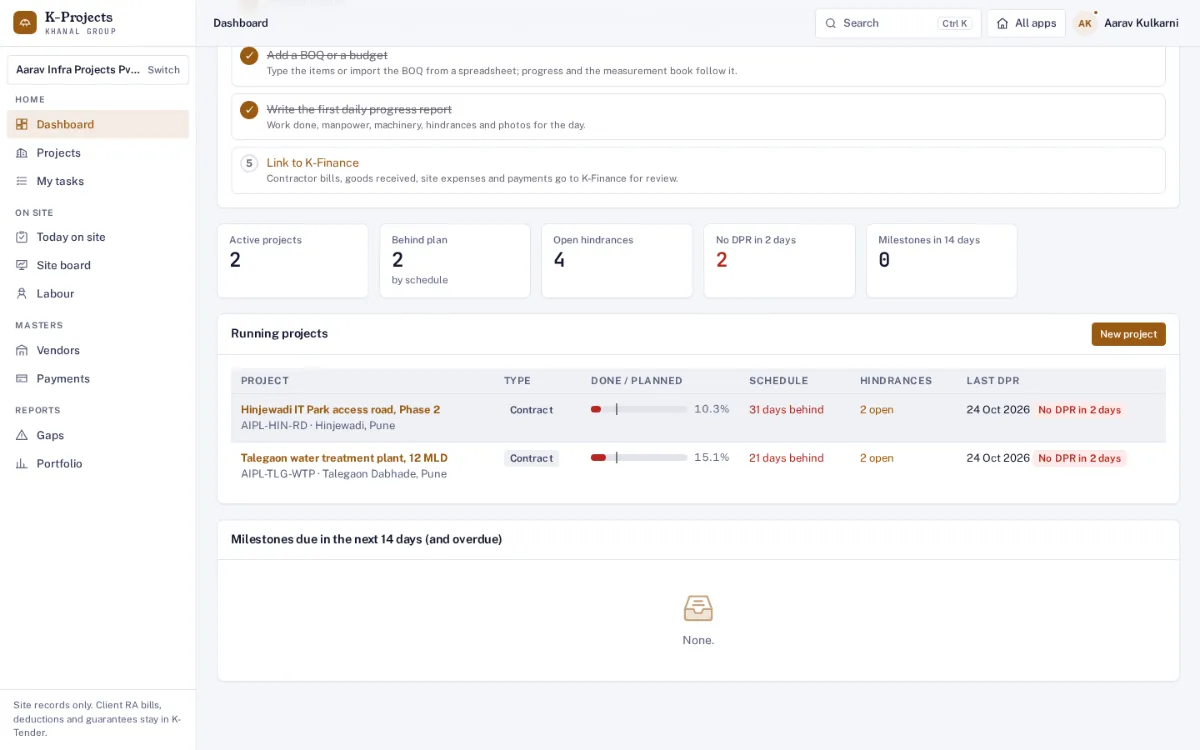
Active projects, projects behind plan and open hindrances, across every site.
Sites with no DPR in two days, counted in red.
Done against planned for each project, and days behind schedule.
Date of the last DPR, flagged when a site goes quiet.
Demo data on staging.
PK-ProjectsConstruction projects
Run every site from the daily progress report up
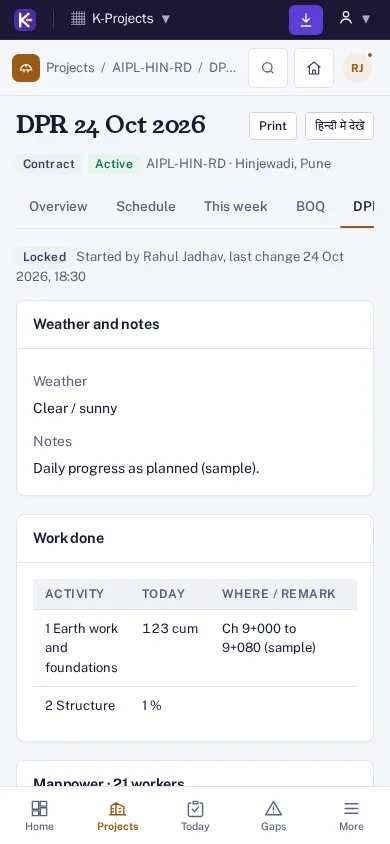
K-Projects is for civil and sports-infrastructure contractors and builders. Site engineers file the daily progress report from the phone: work done by activity, manpower, machinery, hindrances and photos.
The office sees done against planned for every project, sites with no DPR in two days, the measurement book and the RA bill abstract for the client bill.
Daily progress report from the phone
Measurement book with an engineer check
RA bill abstract at BOQ rates
Owner dashboard: days behind, missing DPRs, milestones due
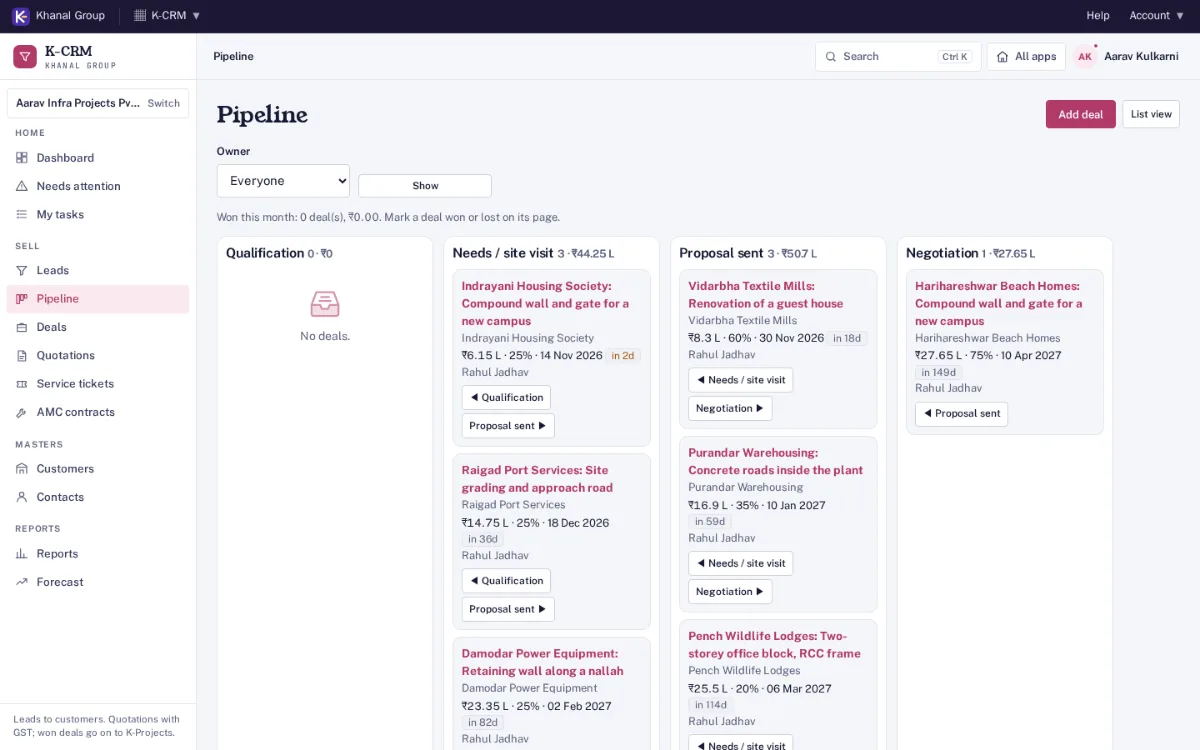
Each stage with its number of deals and total value.
Each deal: customer, value, probability and owner.
Move a deal to the previous or next stage.
Demo data on staging.
CK-CRMSales CRM
From enquiry to accepted GST quotation
K-CRM takes leads from your website form, a CSV or a phone call, checks them for duplicates and assigns them by city, product or in turn.
Deals move across a pipeline board with a monthly forecast, and a quotation built from the deal’s lines with HSN / SAC and the right CGST, SGST or IGST can be accepted by your customer online.
Website forms and CSV import with a duplicate check
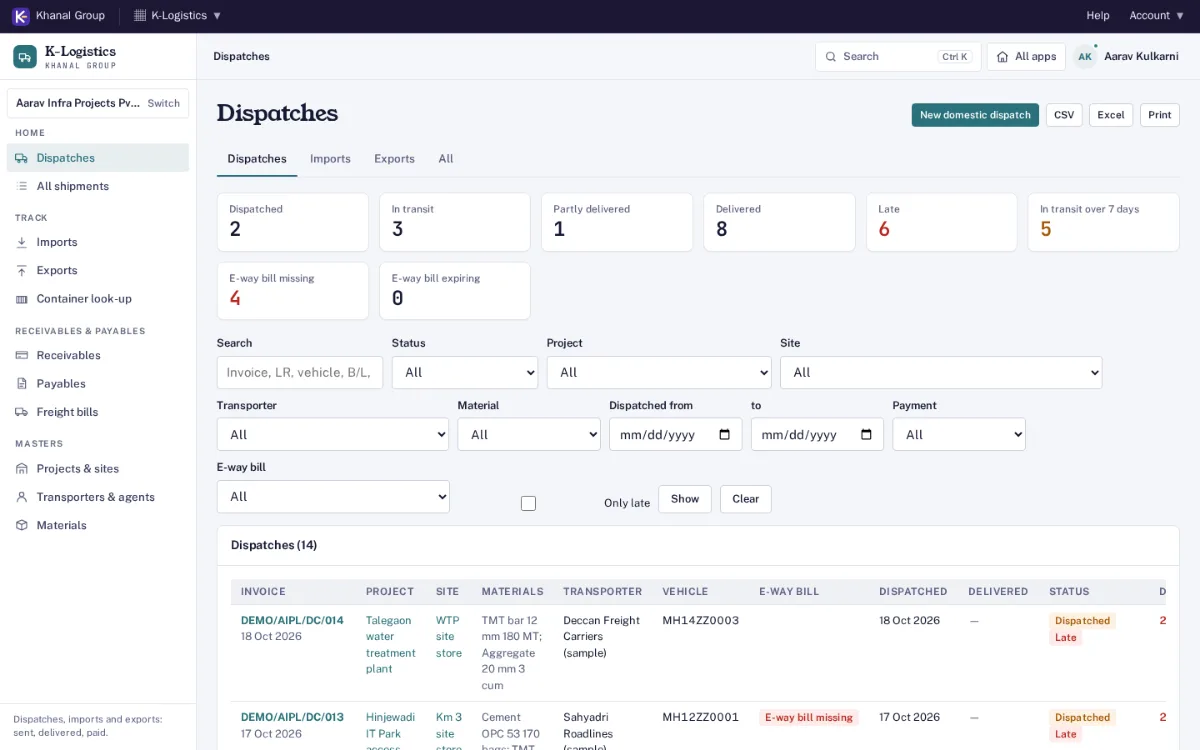
Counts by status: dispatched, in transit, partly delivered, delivered.
Late shipments, and shipments in transit for more than 7 days.
Dispatches with a missing or expiring e-way bill.
Filter by project, site, transporter, material, dates, payment and e-way bill.
Demo data on staging.
LK-LogisticsDispatch and shipments
Which material went where, and what is still owed
K-Logistics keeps one record per invoice: material lines, project and site, transporter, vehicle, LR number and expected delivery, with status history and a photo of the signed challan on delivery.
Imports and exports carry containers, customs dates and the last free day before demurrage, and receivables and payables ageing shows what each customer or supplier still owes.
Dispatches by invoice, project and site
Late shipments shown in red and counted
Imports and exports with customs dates and containers
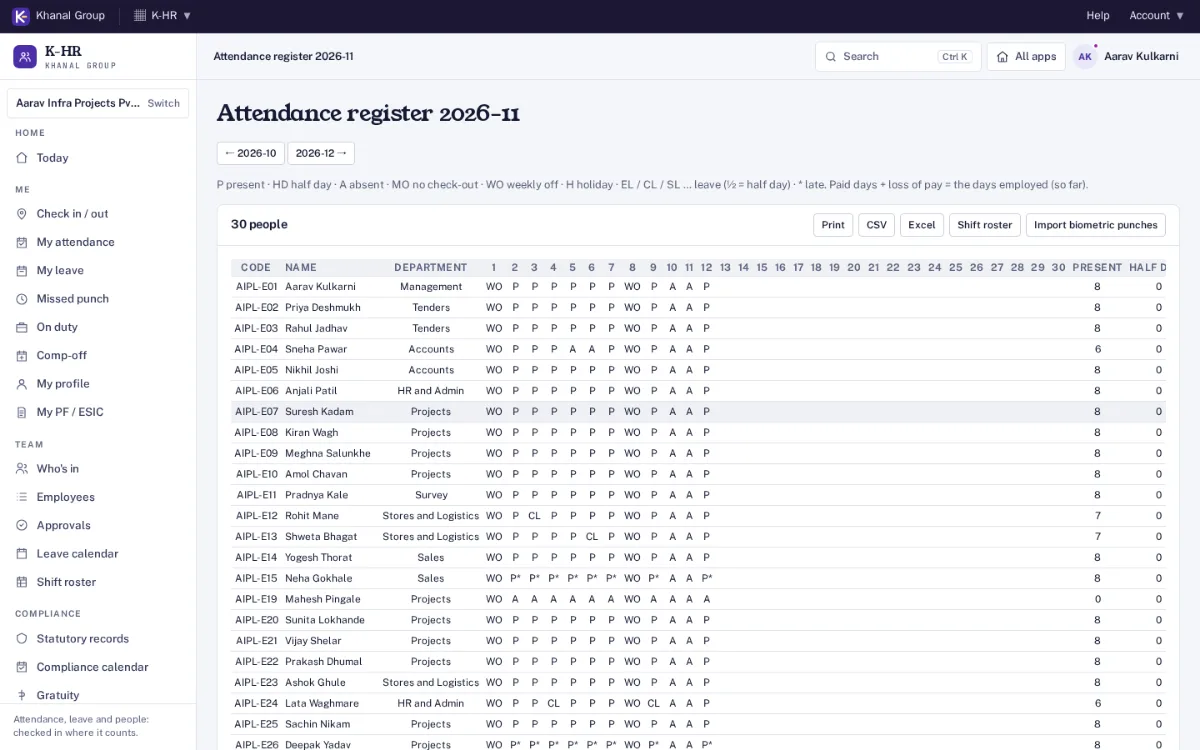
Marks for present, half day, absent, no check-out, weekly off, holiday, leave and late.
Every employee by code and department, with a column for each day.
Days present in the month so far.
Print it, or export to CSV or Excel.
Demo data on staging.
HK-HRHR and attendance
Who checked in, from where, and every day on one register
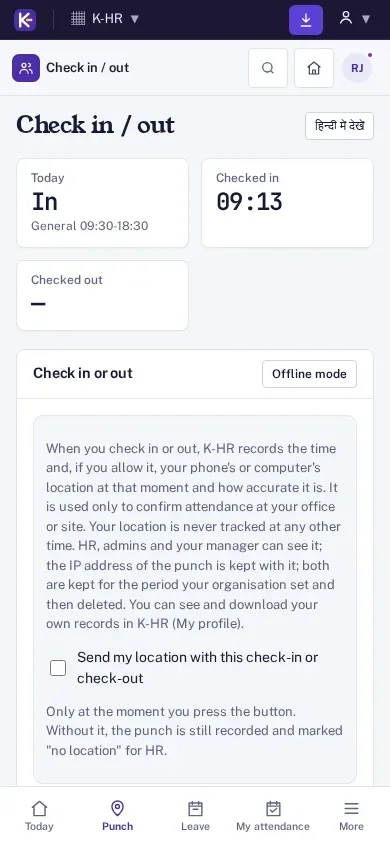
Employees check in and out from a phone or a computer; the location is read only at that moment and only with their consent, and a check-in with no signal is sent when the connection returns.
Managers see who is in, late, on leave or off by location and approve leave and missed punches; the attendance register shows the month for everyone, and the month’s attendance goes to K-Finance payroll.
Phone check-in with office and site geofences
Today board and monthly attendance register
Leave types, balances and approvals
PF, ESIC, PT and LWF records and a compliance calendar
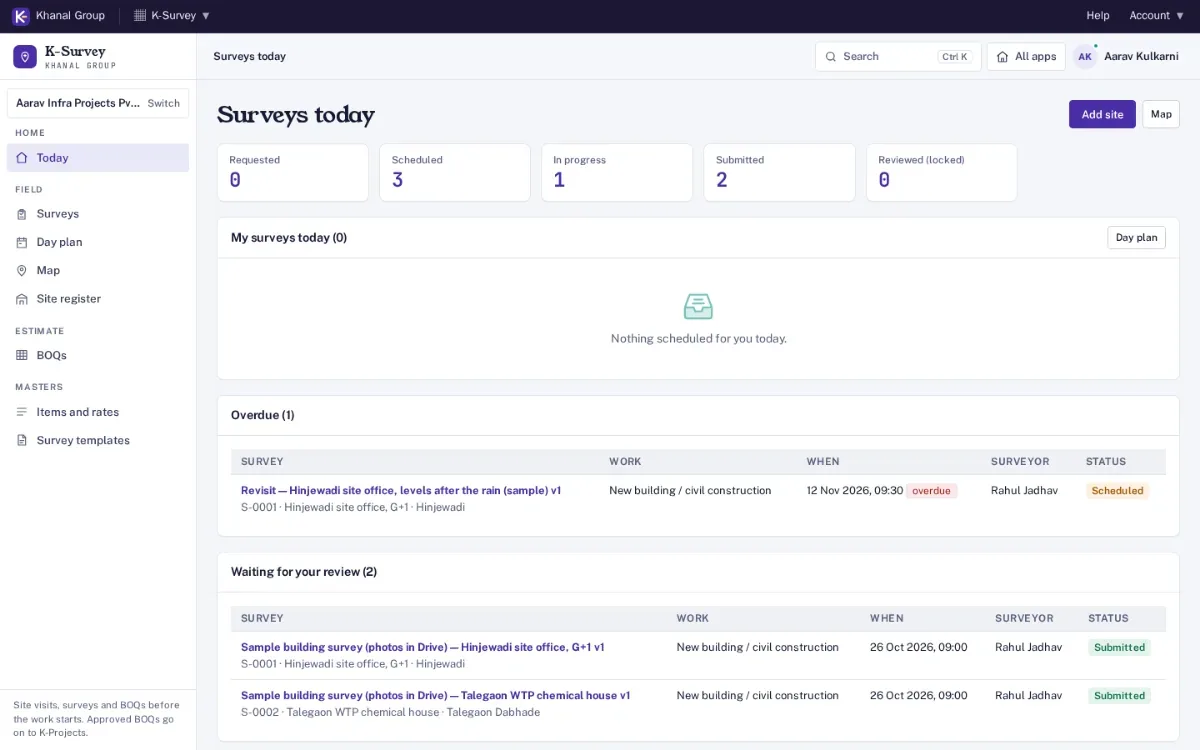
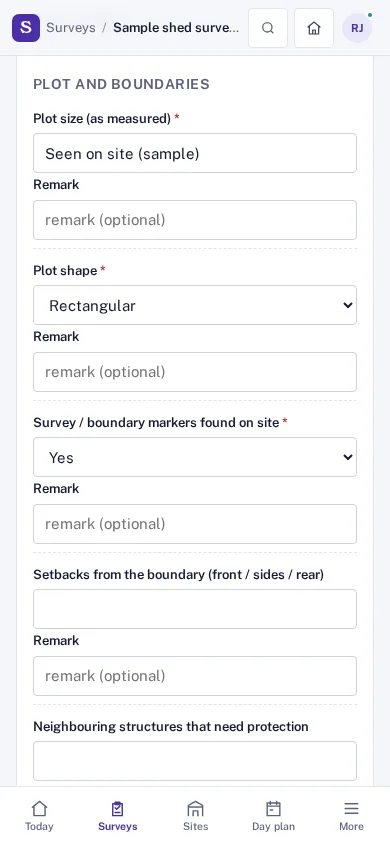
Surveys by stage: requested, scheduled, in progress, submitted and reviewed.
Today’s visits for the surveyor, and the overdue ones.
Submitted surveys waiting for the office to review.
Demo data on staging.
SK-SurveySite surveys
Everything checked at a site before the work starts
A surveyor opens the survey on the phone, checks in with GPS, answers the on-site checklist, fills the required photo angles and takes measurements, even with no signal.
Back in the office the measurements become a BOQ with rates, sent for approval, and the approved BOQ and site facts can go on to K-Projects.
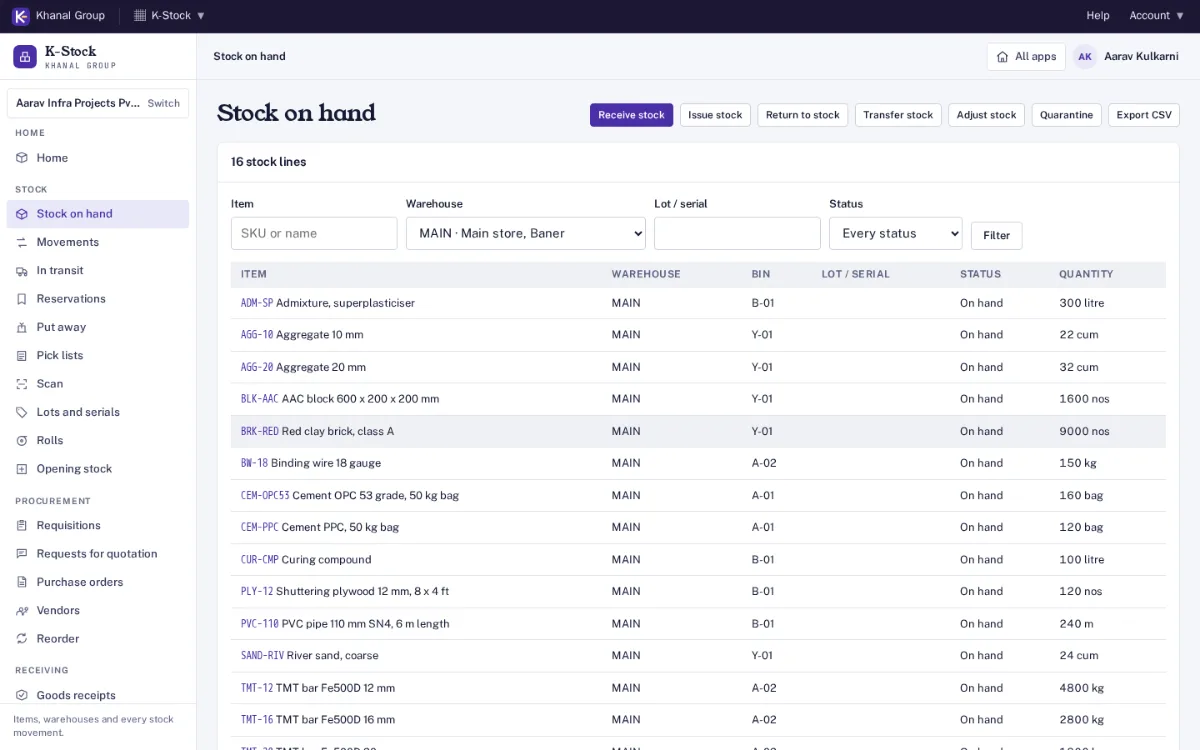
Filter by item, warehouse, lot or serial, and status.
Every stock line: the item by SKU, the warehouse and the bin it sits in.
The quantity on hand in the item’s own unit: bags, cum, kg, nos, litres, metres.
Receive, issue, return, transfer, adjust or quarantine stock, and export the list.
Demo data on staging.
KK-StockStock and purchasing
Items, godowns, purchase orders and goods receipts
Items and units, warehouses, bins and lots, one stock ledger with moving-average or FIFO valuation and month close, requisitions, RFQs, purchase orders and goods receipts with inspection, reservations, put-away and pick, labels with QR codes, roll cutting and reorder suggestions. Vendors come from K-Finance when you have it, packed orders hand over to K-Logistics, and the books stay in K-Finance.
Pricing: Khanal One gives every app except K-MailSign and K-IPO, with every feature, for ₹999 per user a month (₹499 at the Founding price), before GST; for example, 10 users = ₹9,990 a month. K-MailSign is ₹75 per user a month, and K-IPO is sold as a banker firm plan. Every app signs in with one Khanal ID. Every app except K-MailSign keeps your documents only in your organisation’s own Google Drive or OneDrive through connected storage, and refuses uploads until a drive is connected; K-MailSign keeps signature images on Khanal Group servers in India. Where each product keeps app records, files and backups is set out in one table: where your data is stored.
One company, one sign-in
How the apps work together
Each app works on its own. When a company uses more than one, work moves between them instead of being typed again.
K-Tender to K-Projects: from K-Tender Professional, a won tender starts a project with its BOQ; on K-Tender Business the contract brings its milestones too, and the RA abstract goes back as a CSV for the client bill.
K-CRM to K-Projects: a won deal becomes a project.
K-CRM to K-Survey to K-Projects: a deal asks for a site survey; the approved BOQ and the site facts go on to K-Projects as a new project or into an existing one, and K-CRM shows the survey’s status.
K-HR to K-Finance payroll: the month’s attendance and leave, new employees, statutory identifiers and exits wait in K-Finance’s review queue; K-Finance works out the pay.
K-Projects and K-Logistics to K-Finance: approved bills, goods received, site expenses, invoices and payments wait in K-Finance’s review queue until a person accepts them. K-Finance also pulls bank guarantees from K-Tender, and contract receivables on K-Tender Business.
K-Stock with K-Finance and K-Logistics: a purchase order finds its vendor in K-Finance by GSTIN, never by name; once the two are linked, every stock movement goes to K-Finance with its value, while the books stay in K-Finance. A purchase order goes to K-Logistics as an inbound shipment, and the delivery comes back as a goods receipt for the storekeeper to post.
K-Projects with K-Logistics: an issued purchase order becomes an inbound shipment, and the delivery comes back as a draft goods received note.
K-CRM to K-Finance: an accepted quotation becomes a draft invoice for review.
Khanal ID: one sign-in, one company and one team for every app, a shared customer and vendor directory, and an owner dashboard with a few figures from each app.
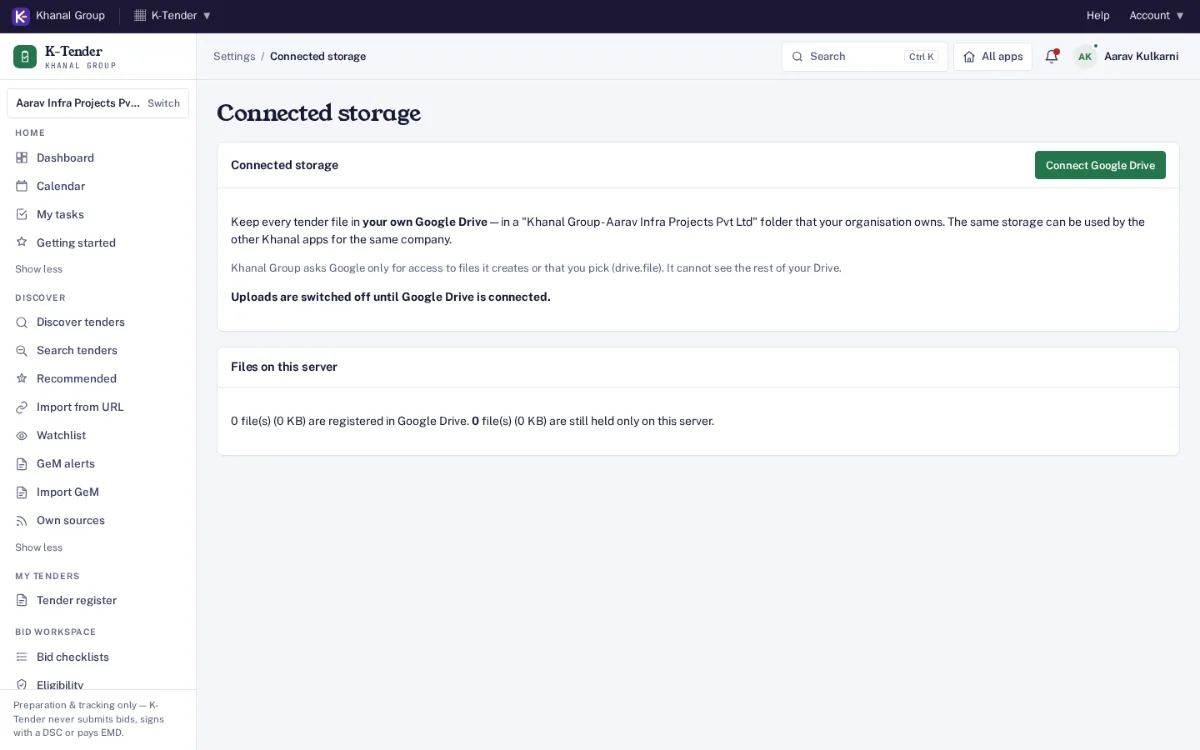
Connected storage: K-Finance and K-Tender files in your own Google Drive or OneDrive; K-Projects and K-CRM too once a drive is connected.
Tally: K-Finance reads masters and the Day Book from Tally through a small script on the Tally PC. It never writes to Tally.
GST, TDS, FEMA and company-law workflows are designed around how they are actually filed and audited in India.
Principle 02
Your data stays yours
Organisations are isolated from each other, you can export your data whenever you want, and we say exactly where each product stores it: the storage table.
Principle 03
Built by someone who does the work
The founder works in corporate finance and compliance and uses these tools himself. More about the founder.
Talk to us
Want a walkthrough of one app or all of Khanal One, or a quote for many users?