Civil and sports-infrastructure contractors working for government, PSU and private clients, and builders running their own projects.
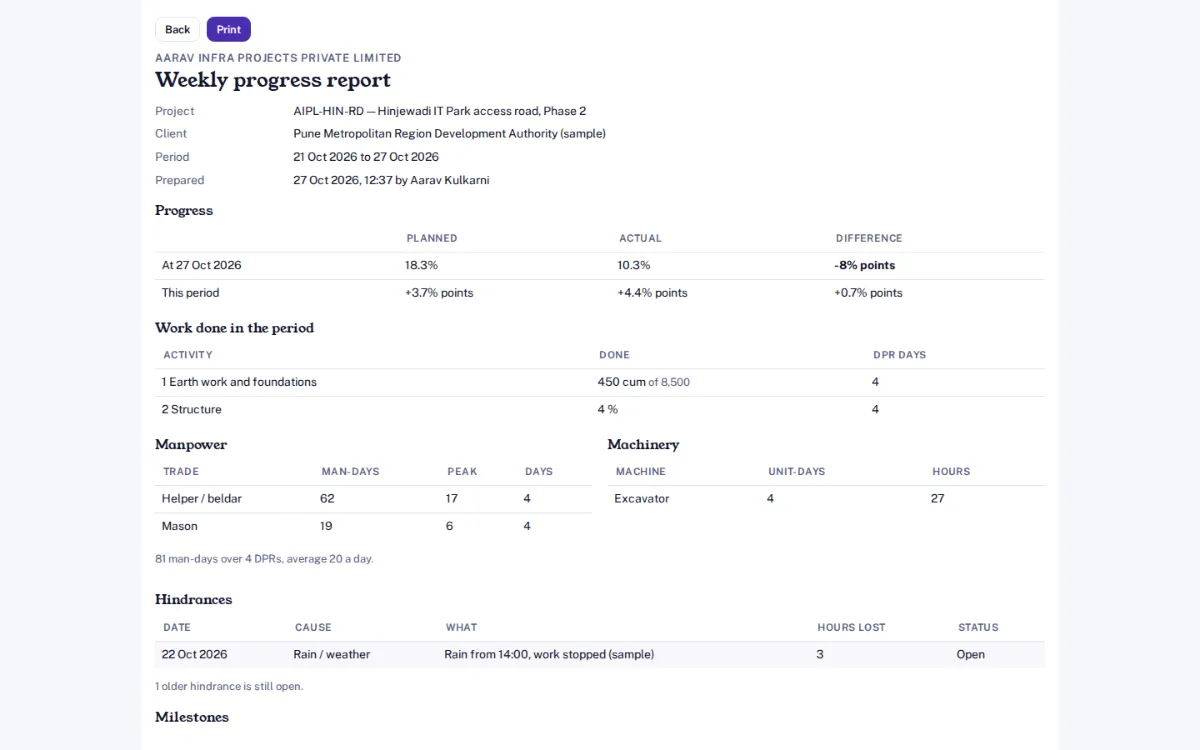
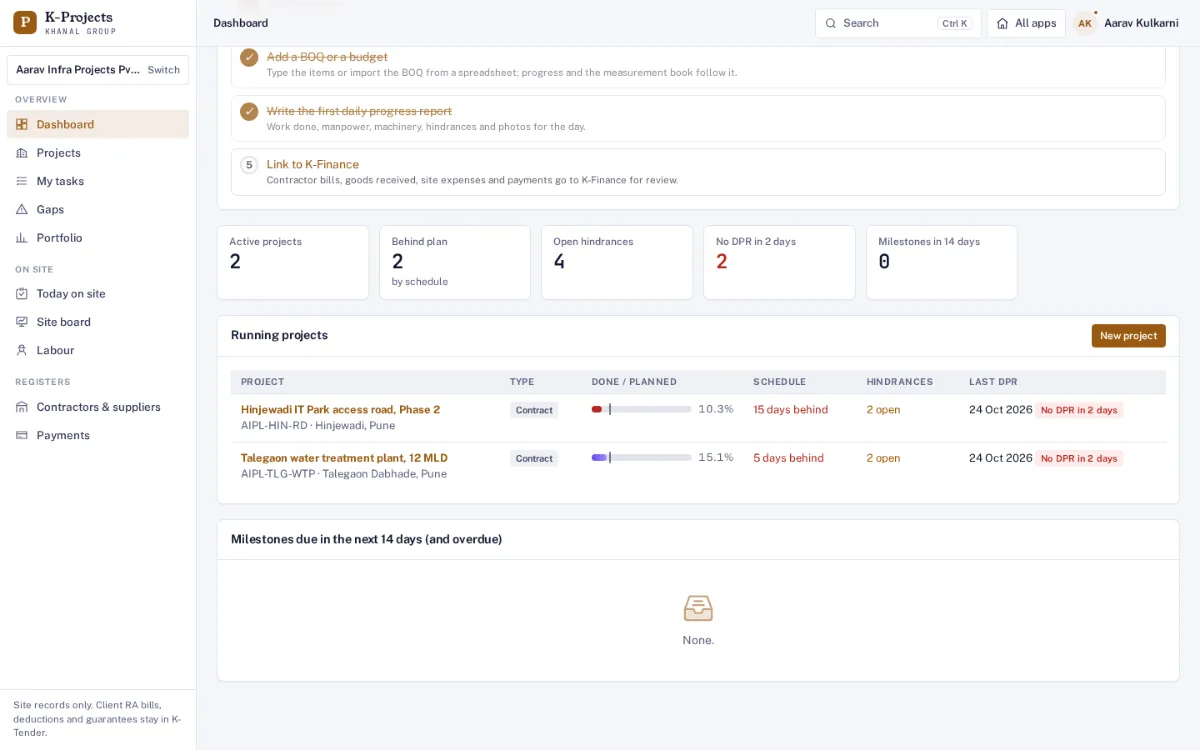
Screens from Aarav Infra Projects, one of our demo companies, on our staging server. Every name, number and email address in them is made up.
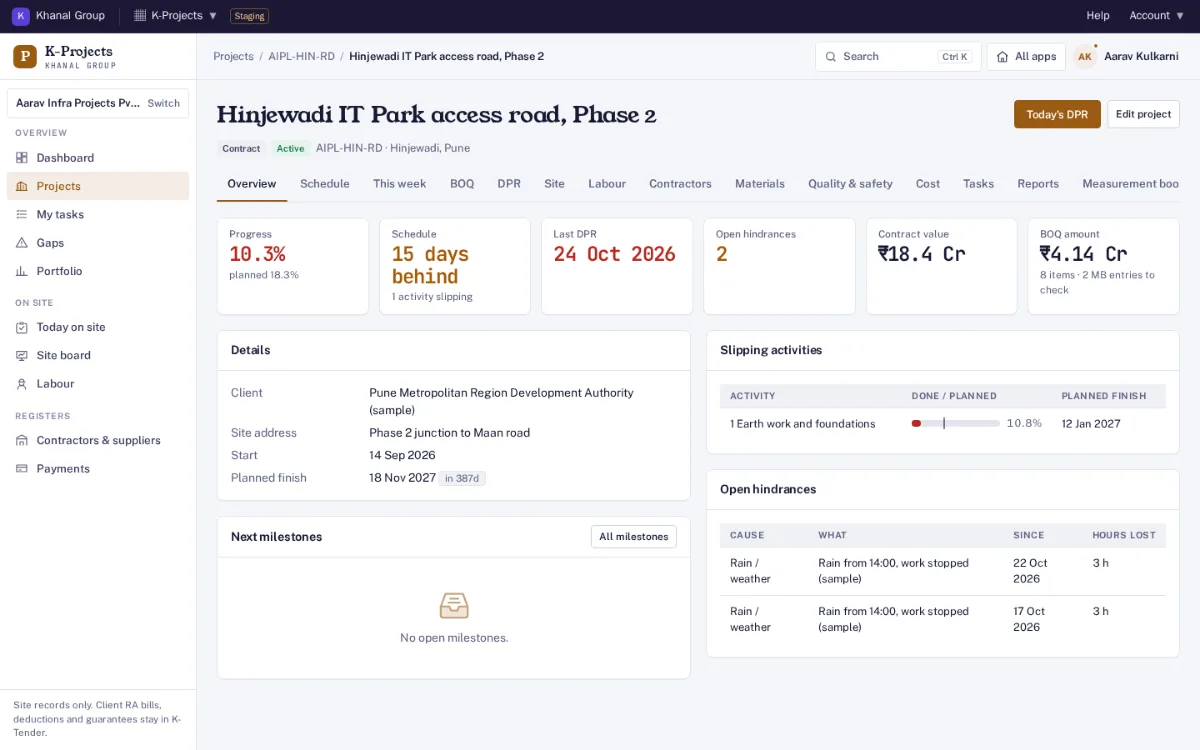
Projects from won work
Create a contract project or an own development project. A tender won in K-Tender can be sent across with its BOQ and milestones.
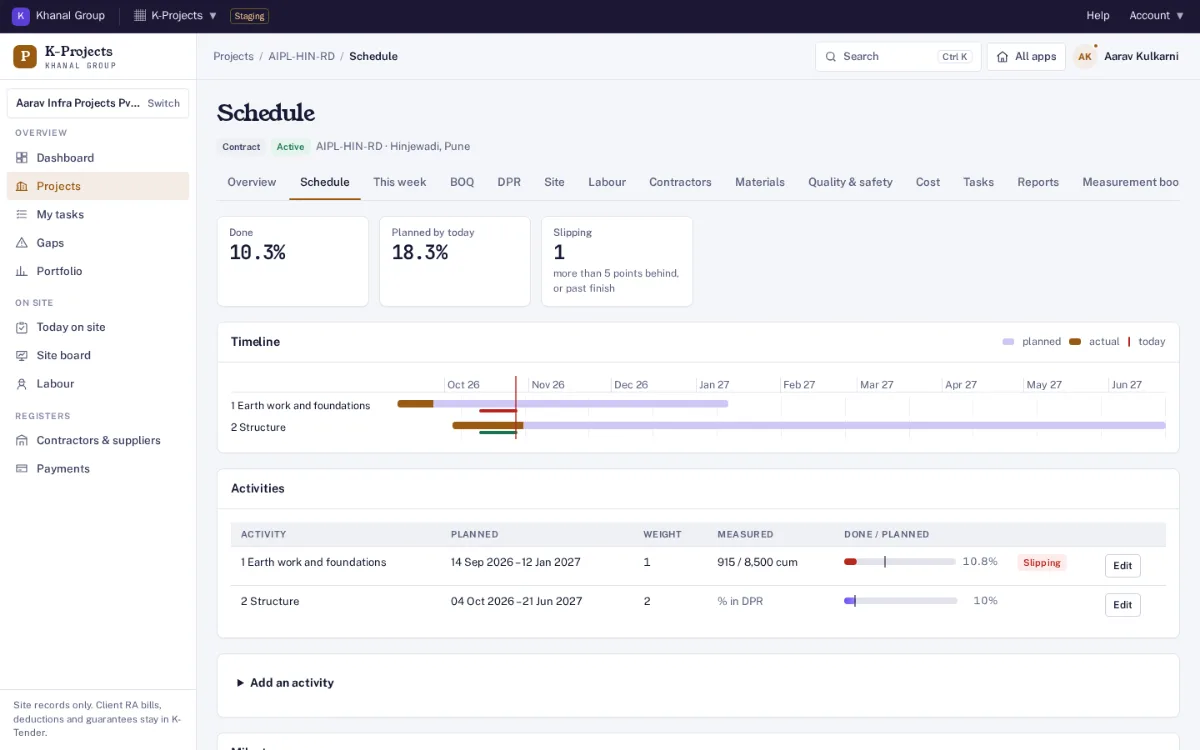
Schedule and progress
Activities with planned dates and weights; progress by % or by quantity from the BOQ. A timeline of planned against done, and slipping work flagged.
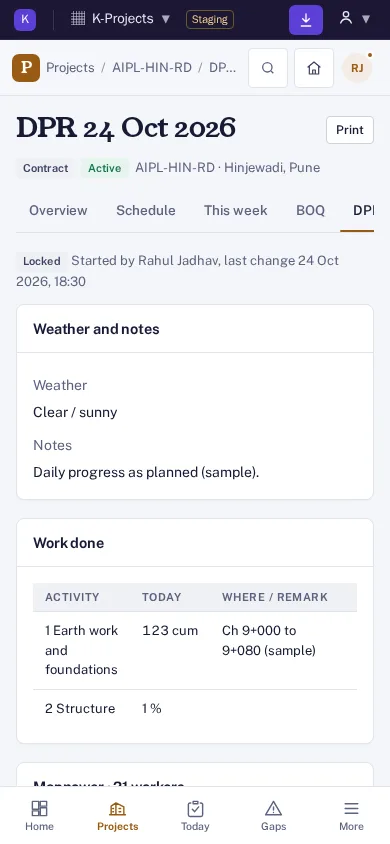
Daily progress report (DPR)
Work done by activity, manpower by trade and contractor, machinery hours, hindrances and hours lost, notes and photos — from the phone, every day.
Measurement book
Nos × L × B × D or a direct quantity per BOQ item, deductions for openings, and an engineer check before an entry counts. Variation warning past BOQ quantity.
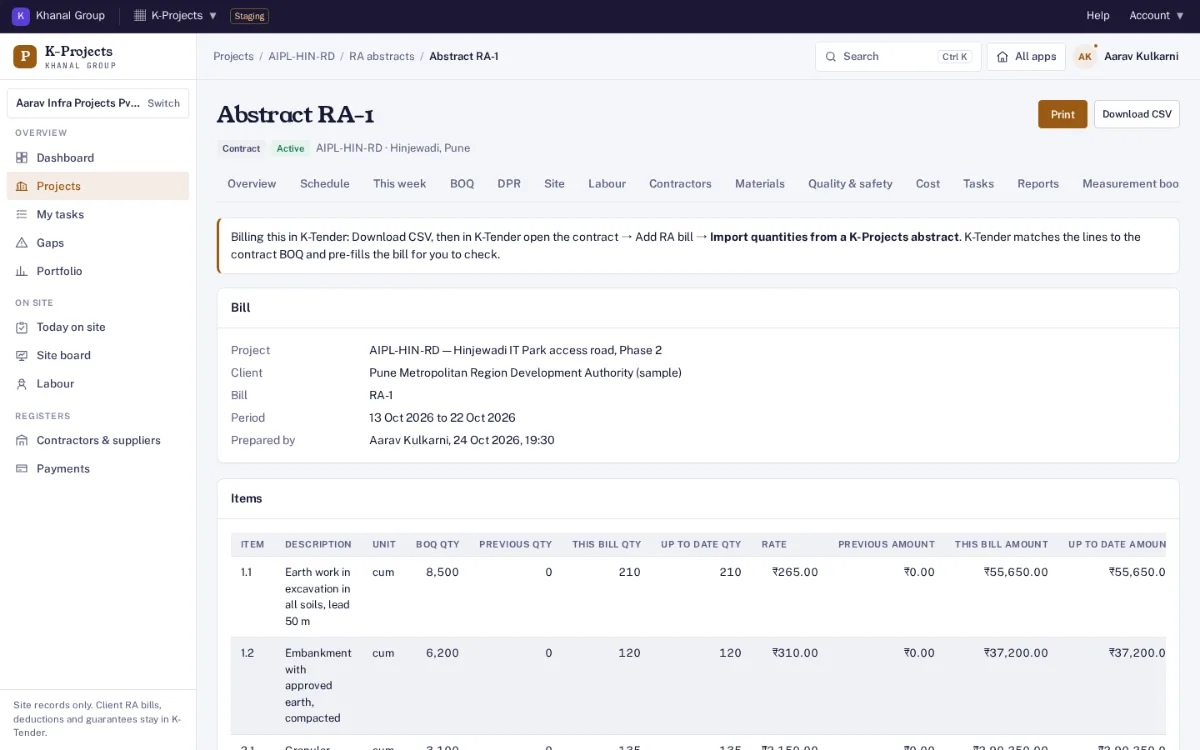
RA bill abstract
Previous, this bill and up-to-date quantities and amounts at BOQ rates for any period, ready to print or export for the client bill.
Drawings and documents
Drawings with number and revision; uploading a new revision supersedes the old one and keeps the history. RFIs, site instructions and approvals in one place.
Owner dashboard
Every running project: done against planned, days behind, open hindrances, sites with no DPR in 2 days, and milestones due in the next 14 days.
Reminders
An email to site engineers when yesterday’s DPR is missing, and to the team when a milestone is due within 3 days.
Labour and site time
Worker register by trade and contractor, daily attendance with time in and out, overtime and GPS on the in-mark, or head counts for gangs. Man-hours, strength by trade, labour plan against actual, and man-hours per unit of work.
Wages and muster roll
Wage sheets from attendance with advances and deductions, approved by a second person. Printable muster roll and register of wages, and a BOCW cess register.
Contractors and work orders
Work orders with rates, retention and advance terms; dated progress updates with photos from site; checked measurements; running bills with GST, TDS 194C, retention and advance recovery; payments and what is still owed.
Materials and stores
Indents, purchase orders and goods received with the challan photo. Issues to work, site stock, stock counts and reorder alerts. Cement and steel reconciliation: theoretical against issued, with wastage.
Plant and equipment
Own and hired machines, a daily log of hours, idle time, fuel and breakdowns, utilisation, and monthly hire statements.
Inspections and quality
Checklists for pre-pour, reinforcement, brickwork, waterproofing, MEP and handover; inspections with photos and a second-person sign-off; NCRs and snag lists through to closure; cube tests with 7- and 28-day due dates.
Safety
Toolbox talks, safety observations, incidents with investigation sign-off, permits to work for hot work, height and excavation, PPE issue, and LTIFR from the man-hours worked.
Budget against actual
Every purchase order, goods receipt, wage sheet, contractor bill, hire statement and site expense lands in one cost ledger per budget head: budget, committed, spent, forecast at completion and margin.
Earned value and S-curve
Planned value, earned value and actual cost, SPI and CPI, and an S-curve of planned against actual progress.
Gaps report
One list of what needs attention on each project and across all of them: late activities, missing DPRs or attendance, stock below reorder level, unpaid bills, overdue NCRs and tests, heads over budget.
Tasks and meetings
Action items with an owner and due date, minutes of site meetings where each point can become a task, and a "my tasks" list across projects.
Weekly and monthly reports
A printable progress report: plan against actual, quantities done, manpower, hindrances, milestones and cost, plus a portfolio view of every running project.
Roles and audit trail
Managers, site engineers who see only their projects, and read-only viewers. Money and acceptance always need a second person. Every change is logged with who and when.
Every plan has the schedule, daily progress reports with photos, labour, contractors and bills, materials, the measurement book and budget against actual. Nothing is sold on top of a plan. Founding price with the code FOUNDING26 for the first 12 months, for organisations that sign up by 31 March 2027 (first 50 per product); then 75% of list in months 13 to 24, then list. Yearly = 10 × monthly, for 12 months. Prices exclude GST. Trial: 14 days, with 3 active projects, 5 team members; no card needed. Payments open at launch; start a free trial now. All apps, bundles and the offer: pricing.
Who is it for?
Contractors executing works for a client (civil works, sports infrastructure, government and PSU jobs) and builders running their own projects. You choose the type when you create a project: contract projects get a BOQ, measurement book and RA bill abstracts; own development projects get budget heads and phases such as towers or blocks.
Does it work on a phone?
Yes. Daily progress reports are written on the phone on site, with photos (the time each was taken is kept, and the GPS location if you allow it). K-Projects can be added to the home screen like an app. Without signal, the day's report (with photos) can be filled offline; the phone sends it by itself when the connection is back, and nothing is posted twice.
How is it different from K-Tender?
K-Tender helps you bid and then manages the contract commercially: the agreement, client RA bills with deductions, EMD and bank guarantees. K-Projects runs the work on site: schedule, daily reports, labour, contractors, materials, quality, safety, cost and measurements. A contract won in K-Tender is sent to K-Projects with its BOQ and milestones in one click, and an RA abstract from K-Projects can fill the client RA bill in K-Tender.
Can I import my BOQ from Excel?
Yes. Save the sheet as CSV and import it. Rows with a problem, such as text in a quantity or an amount that is not quantity × rate, are listed by row number and nothing is imported until you choose to import the good rows.
Who can change what?
Site engineers write daily reports and measurements on the projects they are assigned to. Only project managers check measurements (an entry counts only after it is checked), reopen a locked daily report, or change the BOQ and schedule. Every change is recorded in an audit log.
Where are photos and drawings kept?
Only in your organisation's own Google Drive or OneDrive, in the folder 06 - K-Projects. An admin connects it under Settings, Connected storage; until then uploads are refused. Files pass through our server only while they are uploaded or opened.
How much does it cost?
At the Founding price: Site ₹999 a month (list ₹1,999), Company ₹2,499 a month (list ₹4,999). Enterprise: on request. Yearly is 10 × monthly. Prices exclude GST. Trial: 14 days, with 3 active projects, 5 team members; no card needed.