Connected storage — your documents stay in your own Google Drive or OneDrive
K-Finance, K-Secretarial, K-IPO, K-Tender, K-Projects, K-CRM, K-Logistics, K-HR and K-Survey keep your company's documents only in your organisation's own cloud drive, in one tidy folder tree (06 - K-Projects, 07 - K-CRM, 08 - K-Logistics, 09 - K-HR, 10 - K-Survey and so on). You own the files; Khanal Group sees only its own folder. Until your organisation connects a drive, these apps refuse uploads rather than keep files on our servers.
How it works
1. Choose your cloud
Google Drive (Google Workspace or a personal Google account) or OneDrive (Microsoft 365 work or school, or a personal Microsoft account). One cloud per organisation.
2. Connect once
An owner signs in with Google or Microsoft and approves the limited access. Every app in your organisation then uses the same connection.
3. Work as usual
Files you add in the apps land in the right folder of your drive; the apps open them from there.
Features
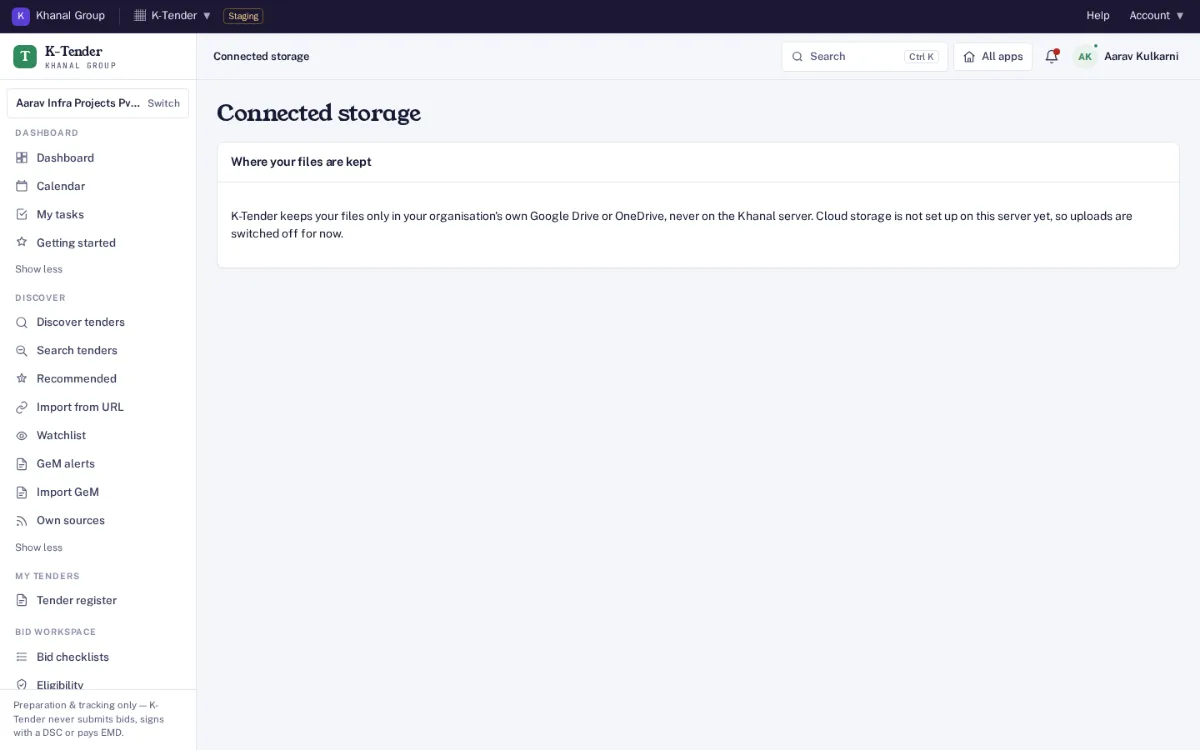
Screens from Aarav Infra Projects, one of our demo companies, on our staging server. Every name, number and email address in them is made up.
K-Tender keeps files only in your organisation’s own Google Drive or OneDrive. On staging no drive is set up, so uploads are off.
A storage page in every app
Each app shows where its files are kept and whether your organisation’s drive is connected. Until an owner connects one, uploads are switched off rather than kept on our servers; on our staging server, shown here, no drive is connected.
One folder tree for the whole company
Every app files into its own numbered folder, so anyone browsing the drive finds things in the same place:
Copies frozen as evidence are kept under 90 - Exports and Recovery / Frozen evidence. Files that K-Secretarial and K-IPO put in Google Drive earlier through their own Drive link stay there and can still be opened; new files go to the folders above. Every product is in the storage table.
Least access. With Google Drive, Khanal Group can open only the files it created or that you pick for it. With OneDrive, only its own folder, Apps/Khanal Group. Khanal Group stores folder ids and the document details the apps need — never the files themselves.
Plans and prices
Plan
What is included
Founding price (list price struck through)
Yearly (10 × monthly)
Included
Free with any app; files stay in your organisation’s own Google Drive or OneDrive
Free
—
Nothing is sold on top of a plan. Founding price with the code FOUNDING26 for the first 12 months, for organisations that sign up by 31 March 2027 (first 50 per product); then 75% of list in months 13 to 24, then list. Yearly = 10 × monthly, for 12 months. Prices exclude GST. Trial: included with every app; no card needed. Payments open at launch; start a free trial now. All apps, bundles and the offer: pricing.
Questions
Can Khanal Group see the rest of our Drive?
No. With Google Drive, Khanal Group can open only the files it created or that you pick for it. With OneDrive, it can open only its own folder, Apps/Khanal Group. Nothing else in the drive is visible to it.
Personal account or company account?
Either. Google Drive works with a Google Workspace or a personal Google account; OneDrive with a Microsoft 365 work or school account or a personal Microsoft account. A company account is better: if the person who connected a personal account leaves, the files leave with them unless they are handed over.
Can we use Google Drive and OneDrive together?
One cloud per organisation at a time. You can switch while no document is stored in the current one.
What does Khanal Group keep?
Only folder ids and the document details the apps need to work, such as names, types and which record a file belongs to. The files themselves stay in your drive.